Adult Coloring Book - Bloom
- 4.2
- Rating
- 50.00K
- Installs
- Free
- Price
 Analysis by App-foxy
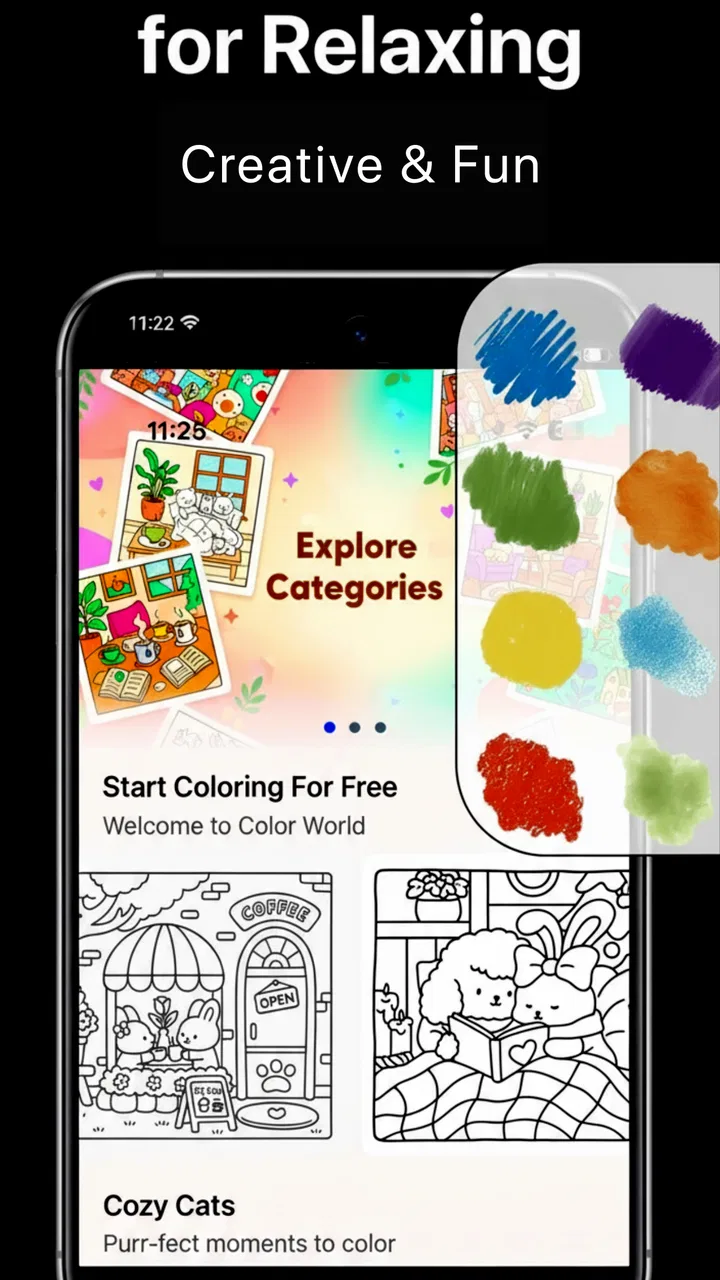
I spent time with Adult Coloring Book - Bloom as a quiet creative app rather than treating it like a full drawing studio. That distinction matters. Bloom is built around the simple idea of relaxing with color, and its place in the Art & Design category is easy to understand: it gives you a focused activity for filling illustrated pages instead of asking you to learn layers, brushes, or complicated editing tools.
My first impression was that the app works best when I want a low-pressure break. I can open it with no serious artistic goal, choose a page, and settle into the repetitive rhythm of coloring. That makes it more approachable than many traditional art apps, especially for someone who feels intimidated by a blank canvas. At the same time, it is important to understand what I am choosing: this is an adult coloring book, not a replacement for a professional illustration tool.
The app is free to download, which makes trying the basic experience straightforward. Bloom has a 4.2 average from around 2.1 thousand ratings, and it has passed 50 thousand installs. Those figures suggest that it has found a real audience, but they do not tell me whether it will suit every coloring style. In my view, the useful question is not simply whether it is popular, but whether its calm, guided format matches the way you like to create.
You May Also Like

 Blood Strike: 2.5 Anniversary
Blood Strike’s Loadouts Turn Every Drop Into a Tactical Gamble
A close look at Blood Strike’s custom loadouts: how fast access to signature weapons reshapes its battle royale rhythm, rewards preparation, and narrows the gap between fights.

 Pandora - Music & Podcasts
Pandora’s Music Is Easy to Start, but Harder to Recover
Pandora’s strength is its low-effort path from a seed to a station. Its weak spot is how much confidence it asks you to place in connection, setup, and quiet recovery.

 8 Ball Pool
8 Ball Pool Is Built on Rivalries, Rematches, and Routine
A close look at the rivalries, rematches, shared routines, and unanswered safety questions that turn a quick pool match into a persistent mobile community.

 Samsung Music
Samsung Music’s Quiet Strength Is Playing What You Already Own
Its reach comes less from spectacle than from dependable access to a personal library. That simplicity is both the app’s strongest retention engine and its ceiling.

 AccuWeather: Weather Radar
AccuWeather Review: A Quick, Clear Forecast for Everyday Decisions
For everyday plans, the best forecast is the one you can understand quickly. AccuWeather makes rain timing, radar, and local conditions easy to act on, with a few trade-offs.

 Hill Climb Racing
Why Hill Climb Racing Still Turns Crashes Into One More Run
A tiny car, a bumpy hill and one more upgrade: Hill Climb Racing keeps resurfacing because its simple chaos makes every near-miss feel personal.
More From Our News Desk



How Bloom feels in everyday use
I find Bloom most useful when I treat it as a small, self-contained pause rather than a project I need to finish. A practical way to keep the session relaxed is to choose a page and a color mood before I begin, then stop whenever my attention starts to drift; that keeps the activity from becoming another obligation. From there, it helps to look at how the app’s focused format differs from other ways of coloring.
A gentle alternative to starting from a blank page
The strongest part of Bloom is the way it removes the hardest first step in casual digital art. When I open a blank canvas in a conventional drawing app, I often spend more time deciding what to draw than actually drawing. A coloring-book format avoids that problem. The artwork gives me a clear boundary and an immediate task, so I can begin without planning a composition or choosing a brush.
This is especially useful after work or during a short pause in the day. Imagine having ten minutes before an appointment: a large drawing application can feel like too much commitment, while a coloring page gives you a small, contained activity. I can make progress without needing to finish a complete artwork. That makes Bloom feel closer to a mindful routine than to a conventional design project.
The adult focus also changes the mood compared with children’s coloring apps. I would not choose this expecting lessons in color theory or a playful educational system. I would choose it because the activity is intentionally simple and visually oriented. The appeal is in slowing down, making small decisions, and watching a page gradually become more personal.
Why the simple format can be surprisingly useful
A non-obvious benefit of a coloring app is that it gives me a way to practice restraint. In a blank drawing tool, I can add too much, undo repeatedly, and lose the original idea. A coloring page limits the structure while leaving room for choices in palette and mood. That balance is useful for beginners who want creative control without the pressure of inventing every line.
I also found that the format works well for testing color combinations. Instead of creating a finished illustration from scratch, I can try a warm palette on one area, a cooler approach on another, and judge the overall feeling as the page develops. This is not the same as a dedicated color study tool, but it is a friendly way to become more deliberate about contrast, repetition, and emphasis.
My practical tip is to avoid choosing colors one section at a time without a plan. I get a more coherent result when I first decide on a small mood, such as soft and muted or bright and energetic, then repeat a few related colors across the page. That turns the activity from random tapping into a small design exercise while keeping it relaxing.
When the experience is most comfortable
Bloom makes the most sense when I use it in short, repeatable sessions. I would not approach every page as a project that must be completed in one sitting. Stopping halfway is part of the value: the unfinished image gives me an easy place to return to, and the app does not demand the kind of concentration required by a detailed illustration workflow.
It can also fit into a bedtime routine for people who prefer a visual activity over scrolling through social media. I would still keep screen brightness and personal habits in mind, but the coloring action itself is less socially demanding than messaging or browsing. For me, the important difference is that Bloom gives my attention one narrow subject instead of encouraging constant switching.
That said, relaxation is personal. Some people find repeated coloring calming, while others need music, guided breathing, or a more interactive game to unwind. Bloom should not be treated as a guaranteed wellness solution. Its value comes from the activity it provides, not from a promise that it will solve stress or improve sleep.
Cost, free access, and the purchase decision
Bloom is listed as free, so I can test its general appeal without paying before I know whether digital coloring suits me. That is a meaningful advantage in this category because the core question is experiential: do I enjoy coloring on a phone or tablet, and do I like the app’s particular approach? Free access lowers the risk of finding out.
The app also includes optional in-app purchases ranging from $0.49 to $89.99 per item. That is a wide span, so I would pay attention to the purchase screen before confirming anything. The free entry point is clear, but the presence of higher-priced individual items means I would not assume that every part of the library or every desirable option is included at no cost.
From a value perspective, I would separate two decisions. First, is the free experience enjoyable enough to become a regular habit? Second, if I want more content, does a specific purchase add enough value for my own use? Those are different questions. I would not buy simply because I had already spent time in the app, and I would not assume that a higher price automatically means better artwork or a better relaxation experience.
My safest approach would be to use the free portion over several sessions, notice how often I return, and only then consider an optional item. If I color once and lose interest, the free version has already answered the question. If I keep coming back and find myself wanting a particular addition, a small purchase may feel reasonable, while a large purchase deserves much more careful thought.
What Bloom does better than a traditional art app
Compared with a full drawing application, Bloom is easier to start and harder to misuse. I do not need to understand brush settings, canvas dimensions, layers, opacity, or export workflows just to enjoy a few minutes of creativity. That simplicity is not a weakness for the intended audience; it is the main reason to choose this kind of app.
It is also more structured than a blank sketchbook. A traditional art app gives me more freedom, but freedom can become friction when I am tired or unsure what to make. Bloom supplies the visual framework, allowing me to spend my attention on color decisions. For casual use, that can deliver more actual creative time than a technically richer tool.
There is a trade-off, of course. A drawing app lets me create original shapes, correct proportions, build layers, and develop a personal technique. Bloom’s guided format cannot replace that. If my goal is illustration, graphic design, concept work, or learning digital painting, I would choose a dedicated art application instead.
Where a paper coloring book still wins
Paper has advantages that a phone cannot reproduce. A physical coloring book offers a tactile surface, no notifications, and no concern about battery life. Many people also enjoy choosing pencils or markers, feeling the pressure of the tool, and seeing the page change in a physical space. If that sensory part is central to relaxation, Bloom may feel like a convenient substitute rather than a complete replacement.
Digital coloring has its own convenience. I can keep the activity with me, avoid carrying supplies, and begin without preparing a desk. That makes Bloom more practical for travel, waiting rooms, or small living spaces. The choice depends on whether convenience or physical texture matters more to me.
Another trade-off is permanence. With paper, a coloring decision feels final and material. With an app, digital work can feel more forgiving, but also less substantial. Someone looking for a framed finished page or a handmade gift may prefer paper. Someone who wants a portable, tidy activity may prefer Bloom.
Three useful ways to get more from the app
My first suggestion is to use a limited palette instead of selecting every color that catches my eye. Choosing three to five related colors before I start makes the finished page feel intentional and reduces decision fatigue. I can then reserve one contrasting color for a focal area. This small rule gives the session enough structure to feel creative without turning it into homework.
Second, I would use unfinished pages as bookmarks for different moods. One page can become a bright, energetic project for daytime, while another can stay softer and slower for evening use. I do not need to complete everything in one sitting. Treating pages as separate ongoing activities makes it easier to return to the app without feeling that I am repeating the same session.
Third, I would judge the app by how it fits my routine, not by how quickly I can finish an image. The most valuable outcome may be a ten-minute pause in which I stop checking other apps. If I focus only on completion, I risk turning a relaxing activity into another task. Bloom works better when the process matters more than producing a perfect result.
Limitations worth considering before installing
The guided format will feel restrictive to experienced artists. If I want to draw outside the lines, alter the underlying artwork, or build a composition from separate objects, a coloring book is the wrong starting point. Bloom’s appeal depends on accepting the page as a framework rather than expecting unlimited control.
The phone format can also make detailed coloring less comfortable than working on paper or a larger tablet. Small areas may require patience, and long sessions can become tiring depending on the device. I would use a larger screen when possible and take breaks rather than assuming that digital coloring is automatically effortless.
Cost is another point of friction. Although the app itself is free, optional purchases can reach a high amount per item. I would be especially cautious if I were installing it for a child, even though the content rating is Everyone, because the purchase range makes device-level purchase controls sensible. The age rating describes suitability of content; it does not mean every purchase decision is automatically appropriate for every household.
The developer behind Bloom is Koi Apps, and the current version is 1.9. The app requires at least iOS or Android version 12, so I would check the operating system on an older phone or tablet before planning to use it there. That requirement is not a problem for a recent device, but it can matter if I am trying to reuse an older handset as a dedicated relaxation screen.
Who will get the most value
I think Bloom is a good fit for someone who wants a calm, guided creative activity and does not want to learn a complex tool. It is particularly suitable for beginners, casual colorists, and people who enjoy visual routines with a clear beginning but no pressure to produce professional artwork.
It may also suit someone who already owns a drawing app but rarely opens it because the blank canvas feels demanding. In that case, Bloom can serve a different purpose rather than competing directly. The drawing app remains the place for original work; Bloom becomes the easier option for a short reset.
Families should find the Everyone rating reassuring from a content perspective, but I would still keep purchases in mind and use the normal safeguards available on the device. The app can be shared as a casual creative activity, yet the person managing the device should decide whether optional purchases are appropriate.
I would skip Bloom if I need advanced drawing controls, professional output, extensive customization, or a tactile paper experience. I would also skip it if I know that coloring inside predefined artwork feels repetitive. In those cases, a sketching app, a painting program, or a physical coloring book would deliver better value even if Bloom is free to try.
My buy-or-skip verdict
I would recommend trying Bloom when the goal is simple: open an adult coloring book, choose a page, and spend a few quiet minutes making color choices. The free entry point makes that experiment easy, and the format is more approachable than a full art studio. For me, its best quality is not technical ambition but the way it turns creativity into a small, manageable habit.
I would not recommend rushing into the higher-priced optional purchases. I would first confirm that I return to the app regularly and that the available free experience matches my expectations. If I find myself using it often and a particular purchase genuinely extends that routine, the decision becomes personal and easier to justify. If not, I can leave without having paid anything.
Overall, Adult Coloring Book - Bloom is worth trying for relaxed, structured coloring, especially when I want something more creative than passive scrolling but less demanding than drawing from scratch. It is not the right tool for serious digital artists, and it does not replace the feel of paper. For the right user, though, its focused format delivers a pleasant kind of value: a portable pause, a simple creative outlet, and a low-risk way to see whether digital coloring belongs in the daily routine.
FAQs for Adult Coloring Book - Bloom
01What is Adult Coloring Book - Bloom?
Adult Coloring Book - Bloom is a relaxing digital coloring app designed for users who enjoy filling detailed illustrations with color. It typically includes floral patterns, mandalas, animals, nature scenes, and other decorative artwork. The app is aimed at stress relief and creative entertainment rather than professional drawing, making it suitable for beginners as well as people who already enjoy coloring.
02Is Adult Coloring Book - Bloom free to download and use?
The app can generally be downloaded at no initial cost, but some artwork, color palettes, tools, or additional features may be restricted behind in-app purchases or a subscription, depending on the version and platform. Before downloading, check the store listing for current pricing, trial conditions, and renewal details. Also review whether advertisements are included in the free experience.
03Does Adult Coloring Book - Bloom work without an internet connection?
Some basic coloring functions may work offline after the application and its available artwork have been installed, which is useful when traveling or using the app without mobile data. However, new illustrations, cloud features, advertisements, purchases, or synchronization may require an internet connection. Offline availability can vary by device and app version, so test downloaded content before relying on it.
04What features does Adult Coloring Book - Bloom offer?
Adult Coloring Book - Bloom focuses on simple, relaxing coloring controls rather than complex illustration tools. Depending on the version, users may find categorized coloring pages, a selection of colors, tap-to-fill areas, zoom controls, undo and redo options, and the ability to save or share completed pictures. Premium editions may add more artwork, palettes, or special effects.
05Is Adult Coloring Book - Bloom suitable for children?
Although coloring itself is easy to understand, the app is marketed toward adults and may contain detailed designs, advertising, in-app purchases, or privacy and store requirements that parents should review first. It may be appropriate for older children with supervision, but parents should check the age rating, disable unauthorized purchases, and examine the app’s data practices before allowing independent use.
Pros
- Large collection of relaxing floral and nature illustrations
- Simple controls make coloring comfortable for beginners
- Useful zoom feature helps with small
- detailed areas
- Color palettes support creative and personalized artwork
- Finished pictures can be saved and shared easily
Cons
- Some artwork and tools may require in-app purchases
- Ads can interrupt the coloring experience
- Detailed pages may feel repetitive after extended use
- Requires regular updates or downloads for new content
- Limited features may disappoint experienced digital artists

Adult Coloring Book - Bloom
Gallery